
So friendly, knowledgeable and kind. Love getting my nail supplies here.
 Dinelle Lajeunesse
View all reviews on Google
Dinelle Lajeunesse
View all reviews on Google
Choose the colors you offer, personalize your menu, and share your link. Your clients can browse, save their favorites, and choose what they’d like for their next appointment.
Built just for you.
Watch the setup video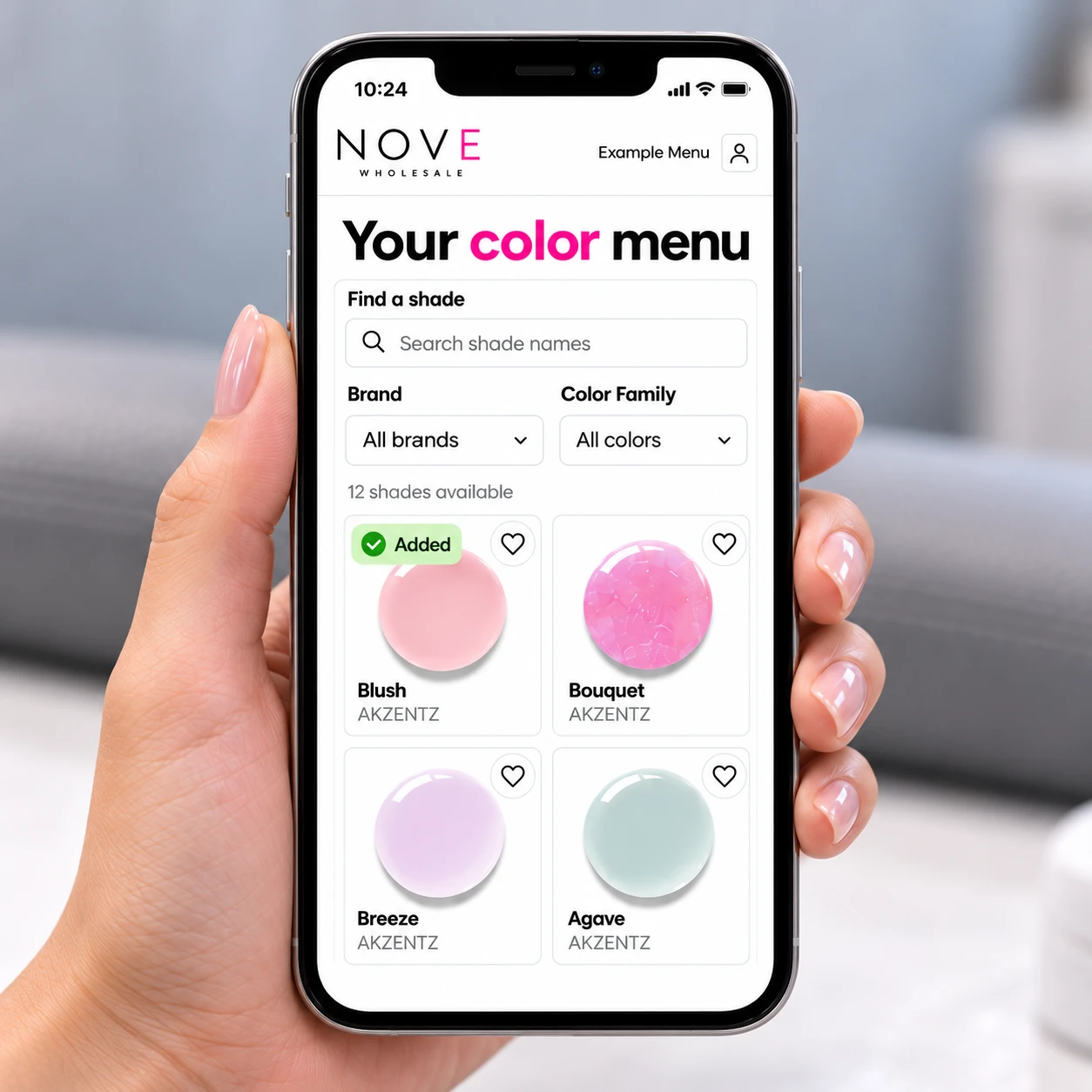
Choose the shades you offer and give your clients one easy place to explore them.
Add your name or business name, choose your personal link, and include a logo if you’d like.
Choose the shades you offer from Nove’s color library. Update your menu as your collection changes.
Use your personal link or QR code. Clients can browse, save favorites, and choose for their next visit.
Follow the full walkthrough or jump to the part you need.
Press Play or choose a chapter.
Nove Academy · 6 minutes 51 seconds
See how to set up your details, choose shades, share your link and QR card, and view your clients’ saved choices.
Pause, replay, or use full screen whenever you need a closer look.
Download the transcriptSend this short guide with your menu link. It shows clients how to use their color choices menu, compare favorites, and save their choices for their next appointment.
View the Client How-to PageYes. Add your name or business name, choose your personal menu link, and upload a logo if you’d like. The logo is optional.
Yes. You select the shades you offer from the Nove color library, and you can update that selection whenever you need to.
Copy your personal menu link for your website, bio, or appointment messages. You can also download your QR code or print a QR card for clients to scan.
Clients can browse without signing in, and their picks stay on that device. To save a profile with you, they enter their name and email and use the sign-in link sent to their inbox.
Open Clients in your color-menu workspace to see saved favorites and next-visit choices. You can also keep a private note for each client.
Sign in with your Nove account to get started.

4.8 from 149 Google reviews
So friendly, knowledgeable and kind. Love getting my nail supplies here.
Dinelle Lajeunesse
View all reviews on Google
Every time I go into Nove I am greeted with smiles, and the staff are so friendly! I love going there for all of my nail supplies. I go in looking for one colour and end up leaving with way more. Their selection is so much fun to look through and if I am looking for a specific nail color, everyone Is fantastic at helping me find the right shade I’m looking for!!
 Amanda Dietrich
View all reviews on Google
Amanda Dietrich
View all reviews on Google
Great personal service. Hands on! Lovely experience. T
 Trudy Sands
View all reviews on Google
Trudy Sands
View all reviews on Google
Great staff. Well informed. Good stock.
 lou gaudet
View all reviews on Google
lou gaudet
View all reviews on Google
Girls were helpful. Lots of selection. Great atmosphere. .
 Dean Prediger (Preds)
View all reviews on Google
Dean Prediger (Preds)
View all reviews on Google
They have an abundance of great things to buy. The employees were very kind and helpful I will be coming back!
 Jessica Hueser
View all reviews on Google
Jessica Hueser
View all reviews on Google
Whenever I walk in there I am warmly welcomed and they are always willing to help me out! Whether that be finding something, or just questions about a certain product!
 Ashlyn Evans
View all reviews on Google
Ashlyn Evans
View all reviews on Google
The ladies who work here are absolutely amazing and so kind!
 Shekinah Petten
View all reviews on Google
Shekinah Petten
View all reviews on Google
LOVE IT HERE! The educators are so good! So happy I chose to go to school at NOVE academy!
 Shayla Millar
View all reviews on Google
Shayla Millar
View all reviews on Google
Nove is an amazing school, Amanda is an excellent teacher and the product is always stocked.
LOVE NOVE!!! instructors, environment everything. THE BEST!!❤️❤️❤️
 Kela Groeschel
View all reviews on Google
Kela Groeschel
View all reviews on Google
Great customer service!
 Shantell Redlick
View all reviews on Google
Shantell Redlick
View all reviews on Google
Today’s experience was great! I was able to park in staff parking as students took all the spots lol. Got all the goodies. Thanks Nove ⚡️
 Hayley-Rae Gardipy
View all reviews on Google
Hayley-Rae Gardipy
View all reviews on Google
Absolutely love the amazing service. My kind of girls! So helpful!!
 Kim Calvert
View all reviews on Google
Kim Calvert
View all reviews on Google
The staff are always very welcoming and helpful. I’ve been going for years and recently popped in to grab some lash extension supplies for a new spa member - they were very helpful in giving me selections and recommendations of everything we needed to get her set to. Really appreciate their help.
 Rachel Mcgonigal
View all reviews on Google
Rachel Mcgonigal
View all reviews on Google
Always a pleasure to shop at Nove!
 Diane Newton
View all reviews on Google
Diane Newton
View all reviews on Google
The nicest ladies and gents I have had the pleasure of dealing with at nail shop. They treat you like family members and always have amazing suggestions! If you have the chance to get product here pleaseee dooo
 Alissa Gaudet
View all reviews on Google
Alissa Gaudet
View all reviews on Google
Always excellent staff and service, so helpful to find things I need 😊 my go to nail shop
 Mikayla Brown
View all reviews on Google
Mikayla Brown
View all reviews on Google
Owners are very kind and professional. Store was clean
 Simon Mascho
View all reviews on Google
Simon Mascho
View all reviews on Google
Always a great experience going in! Very helpful in finding the ‘exact’ color I’m thinking in my head 😂 the ladies at the front are always fantastic to chat with and give great options/advice.
 Candace Wiebe
View all reviews on Google
Candace Wiebe
View all reviews on Google
Great service
 Nicole Danchak
View all reviews on Google
Nicole Danchak
View all reviews on Google
My favourite place to buy nail supplies! Lovely ladies and the store is always clean and fully stocked
 Ashley Ferguson
View all reviews on Google
Ashley Ferguson
View all reviews on Google
Everyone there is so knowledgeable and is willing to help with any questions I have! I will be continuing to buy my products there!
 mercedes prosofsky
View all reviews on Google
mercedes prosofsky
View all reviews on Google
They are extremely helpful and know the products very well! I always love coming to the store and appreciate the knowledge friendly staff!!
 Allison Pasitney
View all reviews on Google
Allison Pasitney
View all reviews on Google
 blaze
blaze